
Warehouse Inventory3.1 - Download
You'll be able to download in few seconds.
Publisher Description
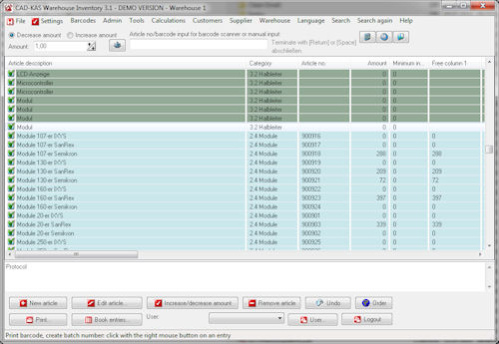
Manage your inventory with this easy to learn software.
If you have an online shop for example this program helps you to keep the overview. You can use a barcode scanner or input the article number manually or simply click a button to increase or decrease the quantity of an entry.
You can print your own barcodes with this software. If you click on the caption of a column the program sorts the articles according to this column. The program creates a protocol and a date base of every transaction. You can always see the exactly time and date and the user who made a transaction.
You can print the actual inventory or the book entries or protocol. You can specify an admin password and deny the access to parts of the program which the actual user must not see.
You can import and export the articles to from and to the CSV file format. You can calculate the date of expiry and batch numbers.
Now with build in cash register function
You can use the software as point of sale software. You can scan the barcodes of articles or create a new article if the article does not already exist. When you have registered all articles you press the button "Ready". The program will ask you which amount of cash the customer has given to you. For example if the customer has to pay $22 and he gives $30 to you. You will enter the 30 and the program will tell you the change. In this case $8. Then you can print a receipt for the customer.
New in version 2.0:
You can reorder the columns. A search function has been added. You can link articles together so you can decrease the amount of all articles at once. New columns for weight and storing location.
Neu in Version 2.1:
Now the program can be used from more than one user at the same time over a network drive (if you have the needed number of licenses). The only limitation is that only one user can make changes at the same time. So if you user edits an articles another user has to wait until the first user has been finished.
About Warehouse Inventory
This Inventory & Barcoding program is available in English, Dutch, French, German, Italian, Spanish, Swedish. It was last updated on 29 September, 2026. Warehouse Inventory is compatible with the following operating systems: Windows.
The company that develops Warehouse Inventory is CAD-KAS GbR. The latest version released by its developer is 3.1.
The download we have available for Warehouse Inventory has a file size of 6.3 MB. Just click the green Download button above to start the downloading process. The program is listed on our website since 2014-08-12 and was downloaded 0 times. We have already checked if the download link is safe, however for your own protection we recommend that you scan the downloaded software with your antivirus. Your antivirus may detect the Warehouse Inventory as malware if the download link is broken.
How to install Warehouse Inventory on your Windows device:
- Click on the Download button on our website. This will start the download from the website of the developer.
- Once the Warehouse Inventory is downloaded click on it to start the setup process (assuming you are on a desktop computer).
- When the installation is finished you should be able to see and run the program.
Program Details
General
System requirements
Download information
Pricing
Version History
version 3.1
posted on 2014-08-12
Now includes point of sale software
version 1.0
posted on 2009-11-15
Disclaimer
External Download
We do not host Warehouse Inventory on our servers. We did not scan it for viruses, adware, spyware or other type of malware. This app is hosted by the software publisher and passed their terms and conditions to be listed there. We recommend caution when installing it.
The external download link for Warehouse Inventory is provided to you by apps112.com without any warranties, representations or guarantees of any kind, so access it at your own risk.
If you have questions regarding this particular app contact the publisher directly. For questions about the functionalities of apps112.com contact us.
